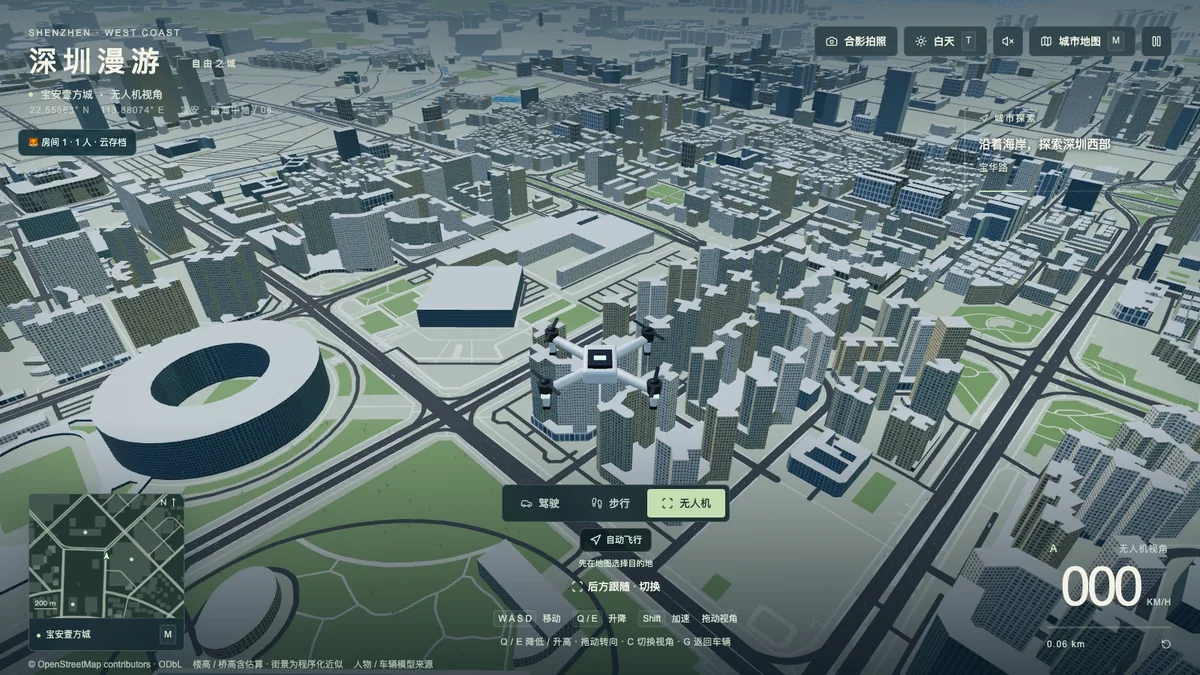
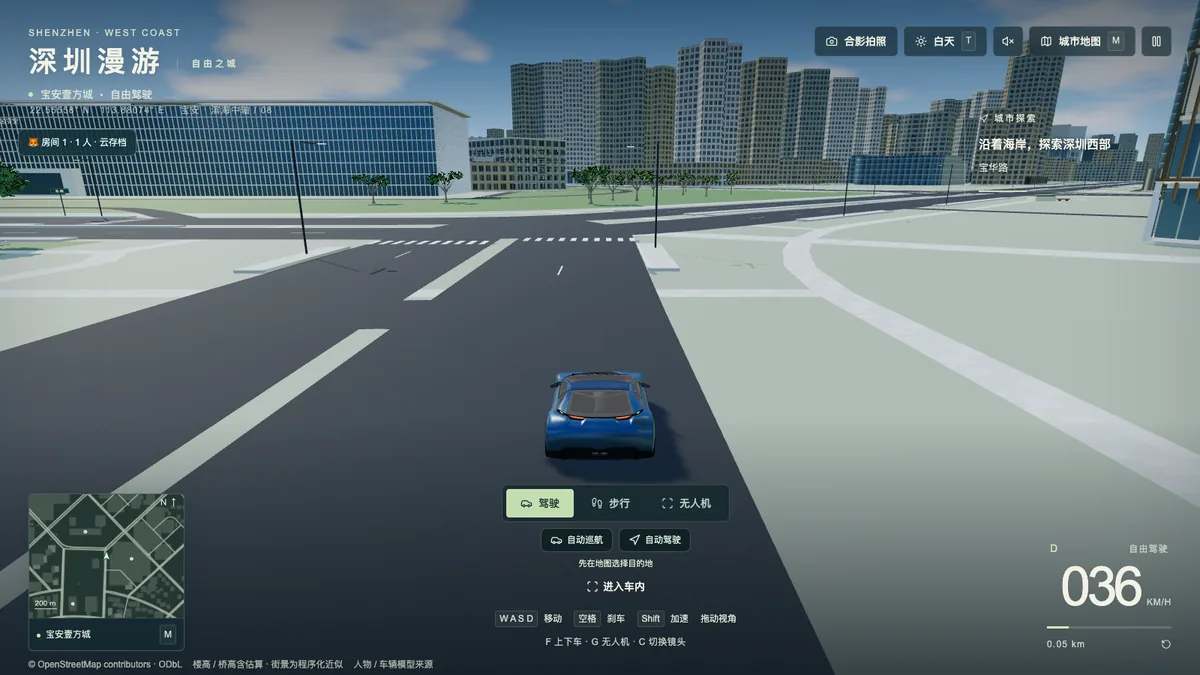
深圳漫游是一个浏览器 3D 城市探索作品:可以开车、下车步行,也可以切到无人机,在福田、南山、前海、宝安中心到机场一带的真实路网上移动。它是游戏,不是现实出行导航。
这篇记录不讲“AI 一键生成游戏”,讲的是把一张真实城市地图塞进浏览器时遇到的三个具体问题:数据从哪来、怎么不让玩家等全城下载完、移动时为什么会卡。开发中 AI 编程助手(Claude / Codex)写了大量代码,我负责方向、验收和取舍;下面每个数字都标明了测量时的版本和条件。
1. 从程序化街区到真实地图
第一版(标记 prototype-v1)只是约 700 米见方的程序化街区,看起来像城市,但哪条路都不存在。第二步改成 OpenStreetMap(OSM)数据:
- 用 Overpass 查询道路、建筑、建筑分块、公园和水域,下载后先校验响应,再原子替换本地快照,运行时不再请求任何在线地图服务。
- 坐标用以本地原点为中心的近似等距投影,X 向东、Z 向南,不混入 GCJ-02。
- 建筑按真实多边形拉伸,保留内院空洞;有
height/ 楼层标签就用,没有就按类型确定性估算,并在数据里标明是估算。福田阶段 4,166 个建筑轮廓 / 分块中,1,416 个有真实高度标签,其余 2,750 个是估算。平安金融中心 599.1 米的顶高来自 OSM 分块。
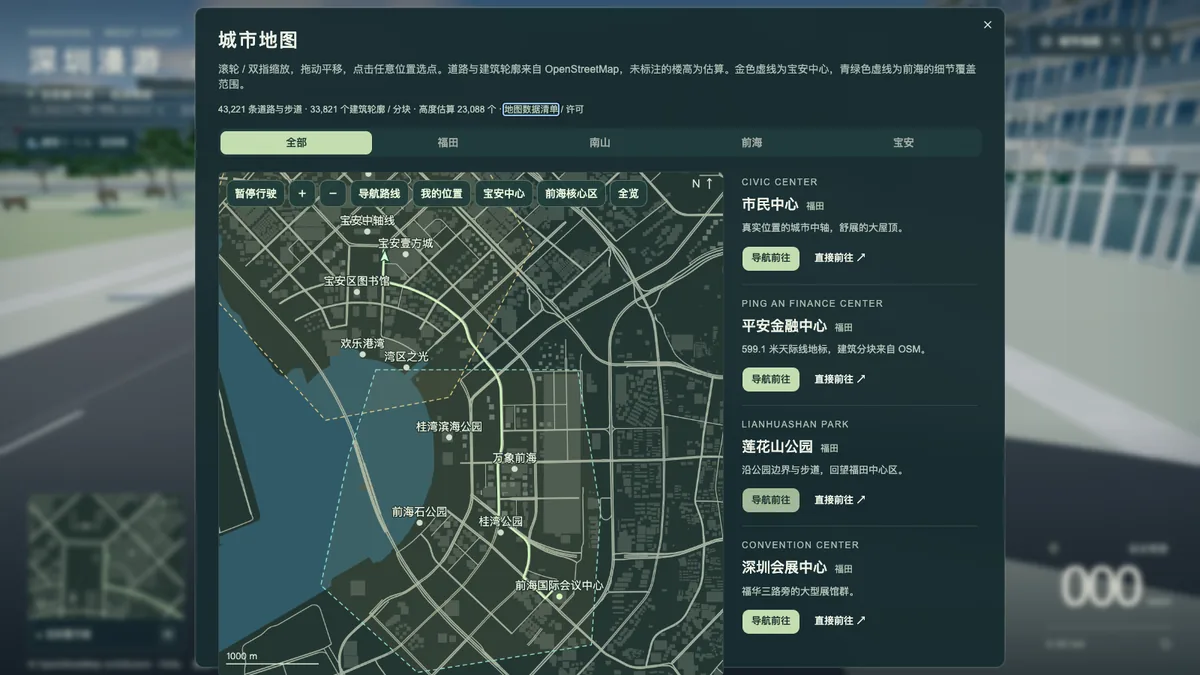
扩展到南山、前海、宝安后,快照变成 43,221 条道路与步道、33,821 个建筑轮廓与分块、5,350 个地表面;其中 10,733 个建筑高度来自标签,23,088 个为估算。地图外接范围约 29.3 × 24.5 公里。海面来自 OSM 的 natural=coastline:按“陆地在左、海面在右”把有方向的海岸线多边形化,而不是铺一块方形水面。
一个小插曲:西部区域的 Overpass 响应在结尾报了输出超时。没有直接丢弃也没有直接相信,而是另跑一次同范围的 out ids,确认 72,612 个对象 type/id 与已下载集合完全一致,再逐项检查坐标完整性后才采用。这个校验后来写成了脚本,会拒绝清单不一致或几何不完整的数据。
2. 不让玩家等全城下载:1,200 米瓦片
全城一次加载在本机能跑,放到公网就不现实。0.4 版把地图切成 451 个 1,200 米瓦片,每栋建筑只归属一个瓦片,并检查切分后道路总长度与原始数据一致。
- 浏览器先读导航数据、全城总览和起点附近的瓦片,之后按玩家位置取用;缓存最多保留 48 个瓦片,正在使用的不驱逐。
- 全城导航从约 10.1 MB 的 JSON 改成 6.08 MB 的二进制拓扑(保留原始 OSM 节点 ID)。服务器对它开启 gzip 后,实际传输约 2.41 MB。
- 起点稳定后读取的地图资源约 13.1 MiB;旧版三份全城 JSON 共约 32.7 MiB,按未压缩口径约少 60%。这是读取体积,不是网络流量,实际下载会随压缩、缓存和你逛的范围变化。
- 近处用完整轮廓,远处用简化体块,无人机飞高后隐藏街道尺度细节;持续慢帧时把像素比从最高 1.5 逐步降到 1。
3. 移动时一顿一顿:把构建搬进 Worker
瓦片化之后出现新问题:一边开车,一边反复弹出“正在加载附近街区”,伴随卡顿。查下来,下载和 JSON 解析早已在 Worker 里,但建筑几何、道路细节、合批、碰撞索引还在主线程;而且移动逻辑会等所有附近街区都准备好才继续响应,每次更新还重画一张 4096×4096 的小地图底图。
改法:
- 新增几何 Worker,和下载 Worker 用 MessageChannel 直接传数据;几何仍用同一套确定性生成规则(没有偷偷换成简化版),算好后把 ArrayBuffer 的所有权转给主线程,不再复制。
- 主线程分小批接入,每批最多 24,576 个顶点或 4,096 个实例,全部就绪后一次挂进场景,未完成前继续显示旧的粗模型。
- 移动只要求脚下这块街区和碰撞索引就绪,不再等其他街区;没准备好的地面边界仍然挡住,避免开进空白。
- 小地图全城底图缓存起来,行进中只更新位置和路线。
当时的实测(本机浏览器、固定 1422×800 绘图缓冲、在前海连续飞行 4 段 × 5 秒):此前从主线程复制一个街区曾测到 28.8 ms;改后主线程单批接入最高约 0.8 ms,Worker 端较重的构建约 280 ms 但不阻塞画面;连续飞行 p95 帧时间 17.3–17.8 ms。
4. 导航和碰撞:宁可不通,也不穿楼
- 导航用 A*,按 OSM 节点建有向图,遵守单行道;两条路几何上交叉但没有共同节点(比如立交上下层)就不连成路口。
- 每段道路按 2 米间距检查车身半径,穿过建筑的边不进导航图;不可达就提示无法连接,不画一条穿楼直线兜底。
- 桥梁层数与连接关系来自 OSM,高度按每层 6 米估算,连接坡道最大坡度约 6%;车辆从坡道上高架后保持在所在层。
- 0.4 版自动测试覆盖 13 个地标之间 156 条有向路线;之后地标扩展到 21 个。
自己试一下
- 入口:深圳漫游,免费,不需要注册或登录。建议电脑浏览器,首次加载给它几秒钟。
- 操作:WASD / 方向键移动,F 上下车,G 切无人机,M 打开地图,地图上点任意位置可以导航或直接前往。
- 其他作品:有哪些用 AI 独立开发、打开浏览器就能玩的小游戏? · 游戏目录
地图数据 © OpenStreetMap 贡献者,按 ODbL 1.0 使用。
Shenzhen Drive is a free browser 3D free-roam: drive, get out and walk, or switch to a drone across the real road network of Futian, Nanshan, Qianhai and Bao’an. It is a game, not real-world navigation. AI coding assistants (Claude / Codex) wrote much of the code; I set the direction, reviewed the results and made the trade-offs. Every number below names the version and conditions it was measured under.
1. From procedural blocks to a real map
The first prototype was a procedural block about 700 m across. It now uses an OpenStreetMap snapshot queried through Overpass, validated, then swapped in atomically; the game makes no online map requests at runtime. Buildings are extruded from real polygons with courtyards kept; tagged heights are used where present and everything else is a deterministic, labelled estimate. The current snapshot has 43,221 roads and paths, 33,821 building footprints and parts (10,733 tagged heights, 23,088 estimated) and 5,350 land surfaces, spanning about 29.3 × 24.5 km. The sea is polygonised from directed natural=coastline ways rather than a flat square.
2. No waiting for the whole city: 1,200 m tiles
Version 0.4 splits the map into 451 tiles of 1,200 m, loaded by player position with a cache of up to 48 tiles. Navigation moved from ~10.1 MB JSON to a 6.08 MB binary graph (~2.41 MB with gzip), and map data read at startup fell from ~32.7 MiB to ~13.1 MiB (uncompressed). Far buildings use simplified blocks, and the pixel ratio steps down from 1.5 to 1 under sustained slow frames.
3. Stutter while moving: building geometry in a worker
Downloads and parsing were already in a worker, but building geometry, road detail, batching and collision indexes ran on the main thread, and movement waited for every nearby tile.
A geometry worker now builds tiles with the same deterministic rules and transfers ArrayBuffers to the main thread, which uploads them in small batches (at most 24,576 vertices or 4,096 instances). Movement only waits for the tile underfoot and its collision index, and the minimap base layer is cached. In a local test (fixed 1422×800 drawing buffer, 4 × 5 s drone flights over Qianhai), the worst main-thread step fell from 28.8 ms to about 0.8 ms, and p95 frame time was 17.3–17.8 ms.
4. Routing and collision: no line through buildings
Routing is directed A* over OSM nodes that respects one-way streets and does not join roads that only cross visually (such as stacked interchange levels). Edges are checked every 2 m against the vehicle radius; edges that pass through buildings are dropped, and unreachable targets say so instead of drawing a straight line. Version 0.4 tests cover 156 directed routes between 13 landmarks, since expanded to 21 landmarks.
Try it
- Play Shenzhen Drive for free, no sign-up. A desktop browser is recommended; give the first load a few seconds.
- Controls: WASD / arrow keys to move, F to get in or out, G for the drone, M for the map; click anywhere on the map to navigate or jump there.
- More: AI-assisted indie games you can play in a browser · Game library
Map data © OpenStreetMap contributors, available under ODbL 1.0.